Detection frequency
300–6200MHz
Coverage distance
0–3km
Detection range
1–3km
Recognized drones
DJI, Autel, FPV and others
Alarm
Sound and light; alarm/clear status
Platform
Independent computer system platform
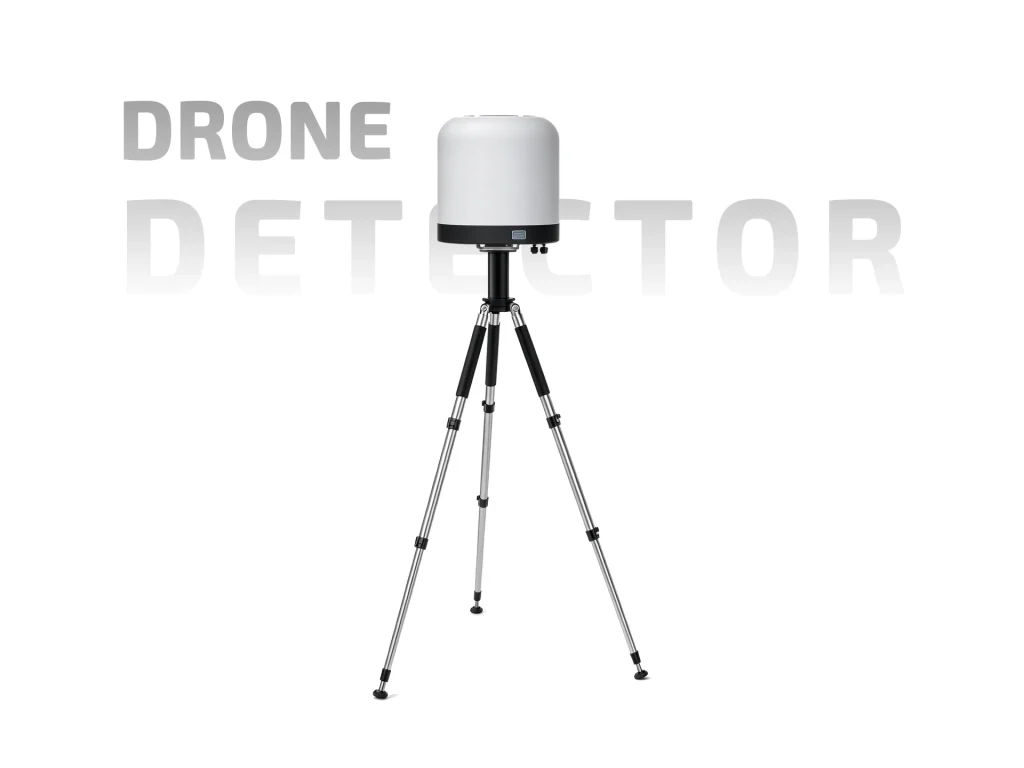
The ETLD-FD95A is a fixed-mount drone detector for sites that need steady airspace awareness rather than a handheld check. It listens across 300–6200MHz, lists 0–3km coverage, and identifies common drone makes such as DJI, Autel and FPV types. A sound and light alarm gives local staff a clear cue, and the unit can run with an independent computer system platform. It also supports drone positioning and integration with a defense system.

Fixed Mount, Continuous Watch
This is not a portable unit. It is installed at a site and left to watch. That changes how teams use it: the detector becomes part of daily security routine, not a tool pulled from a case. Mounting height, antenna direction and cable routing matter more than carry weight. A fixed unit can be checked remotely and logged over time, which suits gates, rooftops, perimeter posts and control rooms. A fixed detector also avoids the staffing cost of a dedicated handheld watch.
Frequency and Coverage
The receiver covers 300–6200MHz. The coverage figure is listed as 0–3km, while detection is often quoted at 1–3km. Treat these as planning figures. Buildings, terrain, antenna height and local radio noise all affect real results. Open ground with a clear sky view is the best case. In dense sites, expect shorter range. A site survey is more useful than a single number: test at the actual mounting point and record what the display shows.
Recognizes Common Drone Makes
The FD95A fixed drone detector is listed as identifying DJI, Autel, FPV and other drones. Make recognition helps operators separate a known consumer model from an unknown link. It does not mean every drone in range will be named. New models and custom links may appear differently. Use the make display as a guide, then confirm with the tracking view and site procedure.
Alarm and Status
Sound and light alarms are supported. There is also an alarm status indication, so staff can see whether the unit is in alarm or clear. This matters on a fixed site: a local light and sound cue helps a guard react without staring at a screen. Mount the light where it can be seen from the guard position. The alarm should be tested on a schedule, and staff should know what to do when it activates. An alarm without a response plan is just noise.
Software Platform
The drone detector can work with an independent computer system platform. That gives a site a dedicated console for viewing detection and positioning data. Operators should be trained on the layout, logging, and alert handling. Record user roles and keep a backup of settings. Keep the software and frequency plan documented so new staff can use the same setup. If the platform connects to other security systems, confirm the integration points before installation.
Positioning and Defense Integration
Drone positioning is supported, and the unit can be linked with a defense system. Positioning helps a team see where a drone is, not just that one is present. Defense integration should follow local rules and site procedure. Detection is the first step; any response needs authorization and a clear chain of command.
Installation Notes
Choose a mount with a clear view of the approach area. Avoid nearby metal that blocks the antenna. Protect cables and check grounding. Run a baseline test before going live, then repeat after any site change. Keep a simple log of alarms, makes, and positions to improve the layout over time.
Summary
The ETLD-FD95A is a fixed drone detector for continuous drone awareness: 300–6200MHz, 0–3km listed coverage, DJI/Autel/FPV recognition, sound and light alarm, status indication, a computer platform, positioning, and defense-system support. It suits sites that want a permanent watch point and are ready to plan installation, response and maintenance.